More apps BoulderLog BoulderTrain BoulderHang Coffee Aeye Glide
Beam · Android TV

Everything you own, one native library.

Mega, any HTTPS seedbox and USB drives in one Leanback library, streamed raw to the decoder. Here's every screen, the player and the engine underneath.

Sources

Three libraries, one chooser

Each source is its own library with its own artwork, stats and hub. They stack into a chooser — and Beam reopens the one you used last.

Mega. Sign in once; your cloud becomes a poster wall. An embedded engine serves files directly — nothing downloads first.
Seedbox (HTTPS). Point Beam at any HTTPS file server for a second cloud library with its own isolated engine — a misbehaving box never touches Mega playback.
Local drives. USB and internal storage with per-drive Movies/TV assignment. Incremental scans; detached drives are remembered and flagged, not forgotten.
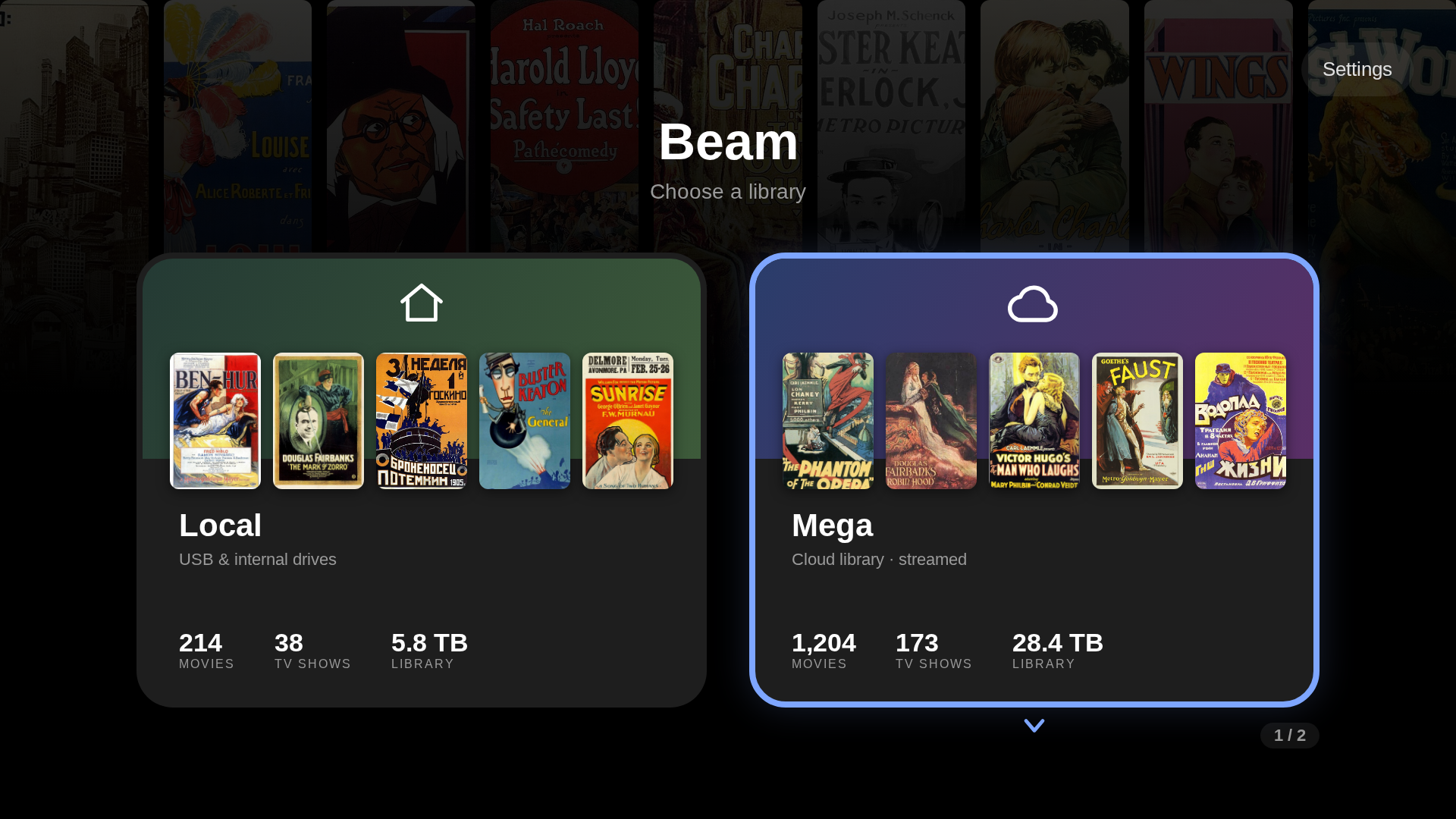
Source chooser — Mega, seedbox, local drives and Kids
Experience

Built for the couch

Every screen designed and battle-tested for D-pad navigation on a Leanback launcher, in Jetpack Compose for TV.

A real TV hub

A cinematic hero with the title's logo mirrors the focused rail, over Continue Watching and Up Next cards that carry each title's logo, and per-launch shuffled Suggestions.

Rich metadata

Posters, backdrops, title logos, ratings and awards from TMDB, TheTVDB and OMDb, cached on-device with a configurable 256 MB–1 GB image cache.

Instant search

Search every movie and show across your whole library as you type.

Tap the cast

Select any actor on a detail page and see everything else they appear in across your shelves.

Franchise & director rails

A film's page gathers the rest of its collection and more from the same director — from your own library.

A–Z quick jump

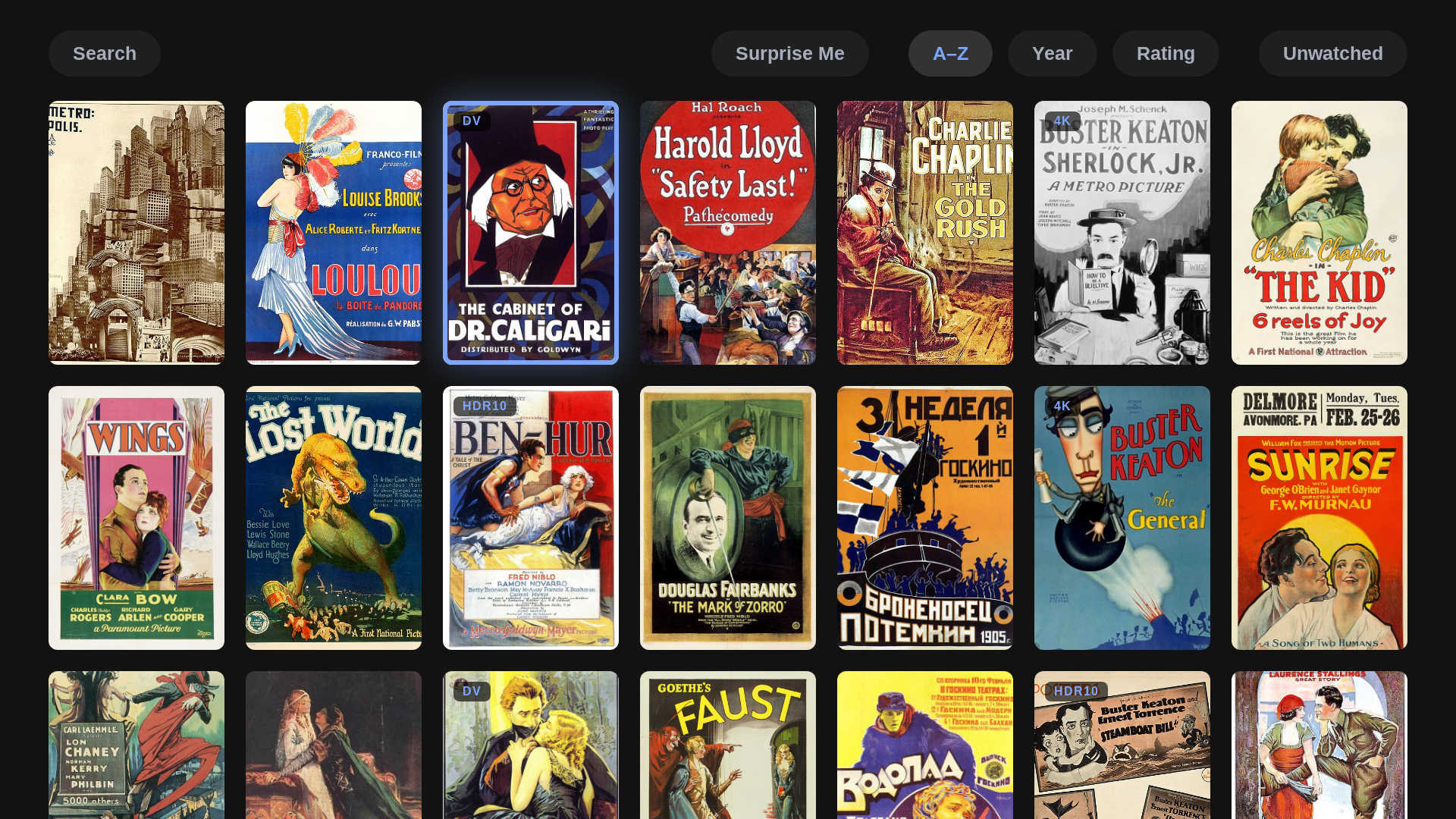
Flick past the last poster and an alphabet strip fades in; jump by letter and focus lands ready to play.

Resume everywhere

Every play action, from any rail or grid, picks up exactly where you stopped.

D-pad first

No touch shortcuts, no phone habits — designed for a remote from the first frame.

Movie library grid with the A–Z quick-jump strip
The library

Your whole shelf, one wall

Posters from every drive and cloud, pooled into one grid. Big libraries get the alphabet strip; every title one press from playing, resuming or its detail page.

Title pages

Every title, its own logo

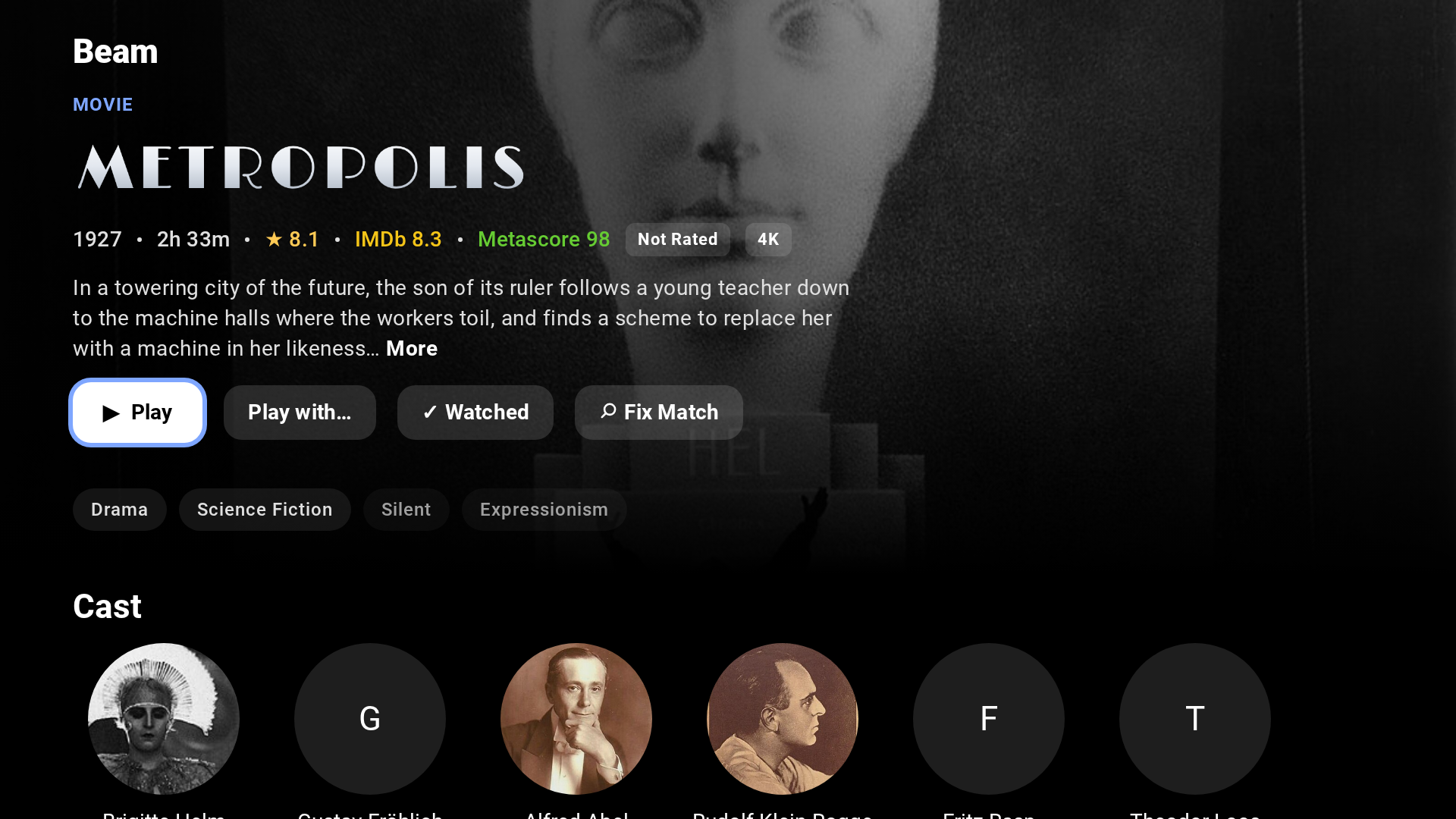
Movies and shows open on their title logo over full-width backdrop art, the way streaming services present them. The logo is cached on the box, and the plain title shows if a film has no logo.

Everything at a glance. Year and runtime, TMDB, IMDb and Metacritic scores, the age rating, the file's quality, genres and a three-line overview that opens in full.
One look everywhere. The same logos appear on the hub, in Beam Mobile and in the web dashboard.
Movie title page — the title logo over a full-width backdrop, with ratings, actions, genres and the cast row
Kids Mode

A library just for them

One switch turns on a hand-picked kids' library. Long-press titles to add them; while it's on, they leave the grown-up library entirely.

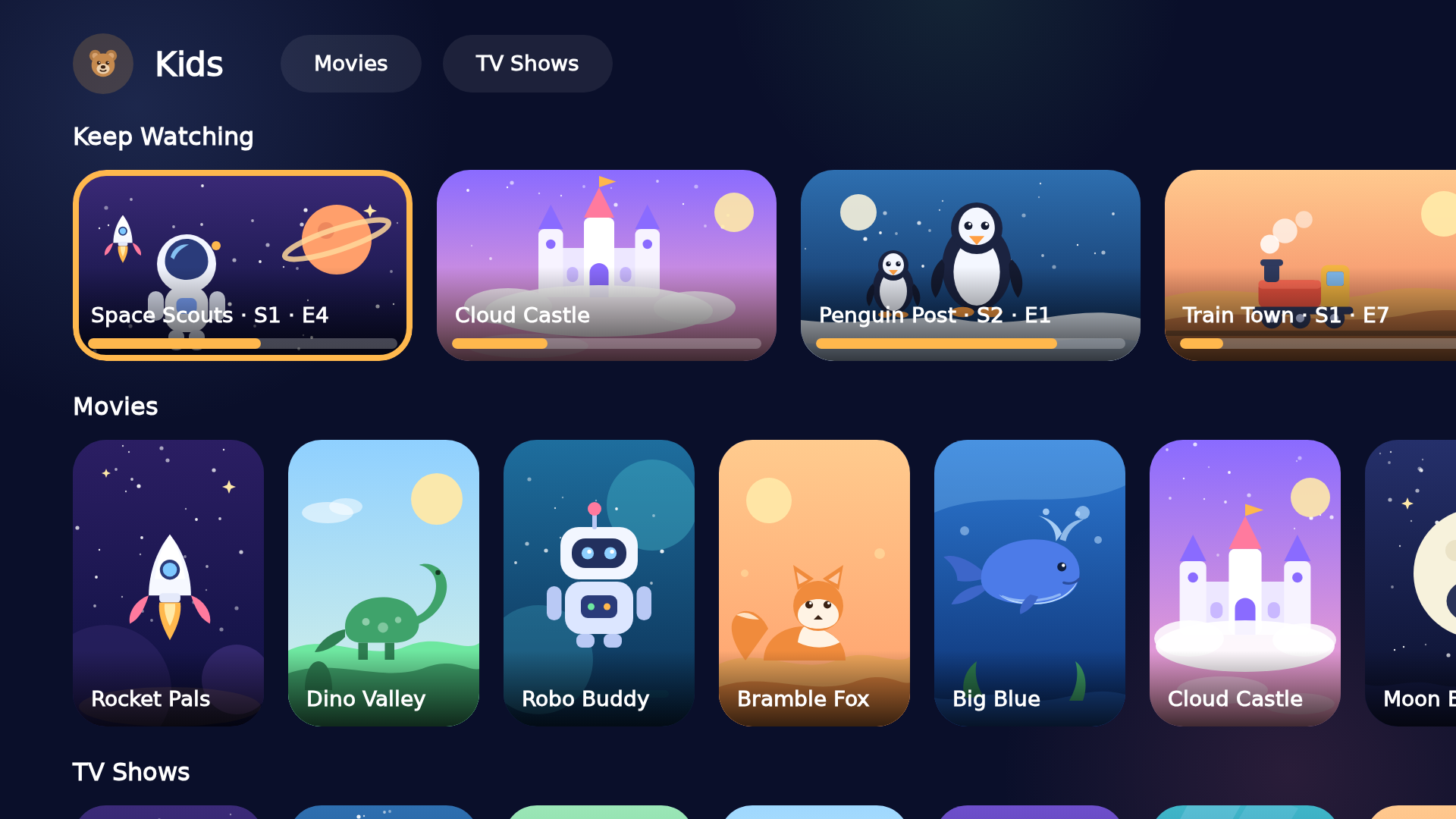
Their own front door. A Kids tile opens a bright hub of big cards — Keep Watching plus their movies and shows, pooled from every source with no source concept at all.
Nothing to wander into. No settings, no menus, no long-press actions, no adult rails; Back only leads to the chooser.
Zero trace when off. Flip it off and the app looks exactly as before, and every pick is remembered for next time.
The Kids hub — Keep Watching, Movies and TV Shows rails of big picture cards
Playback

Playback that respects the source

Original bytes to the decoder, tuned to hold on hardware as old as the 2015 NVIDIA SHIELD.

Match Frame Rate switches the TV to the film's native rate to kill judder.
Tunneled playback — hardware A/V sync for high-bitrate 4K/HDR.
Auto-play next episode with an Up Next card near the end: OK plays now, Back cancels.
External player handoff to VLC, MX or Just Player — a foreground service keeps the engine alive while they play.
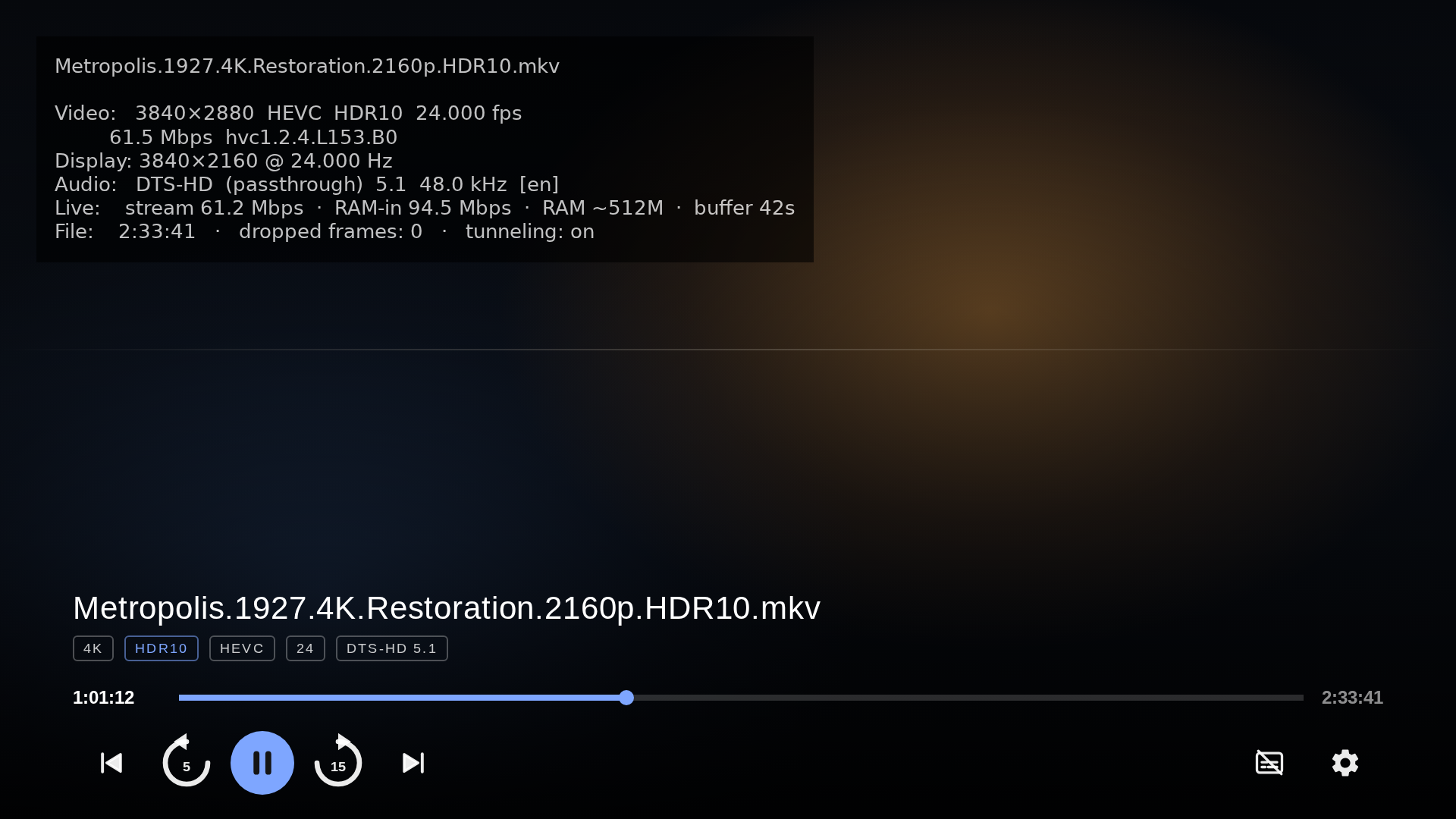
Player with the live stats overlay — codec, fps, bitrate and engine RAM

Live stats overlay

Codec, content fps vs display Hz, dropped frames, live stream bitrate and how much RAM runway the engine holds — refreshed every second.

Analyze media specs

An on-device probe reads each file's real codec, resolution, HDR type and audio — down to Dolby Vision profile strings (dvhe.07.06), HDR10 and TrueHD Atmos.

Display control

Pin the whole app UI to a chosen refresh rate, or leave it to the system.

Dashboard

The whole box, in any browser

Flip one toggle and Beam serves a live dashboard straight from the TV box — open it on any phone or laptop on your network. No cloud, no account, nothing to install.

A real remote. Play/pause, ±30 s, tap-to-seek, episode skip and audio/subtitle switching for whatever is on the TV.
Fling anything. Tap ▶ TV to start a title on the big screen, or ▶ here to stream it to the device in your hand.
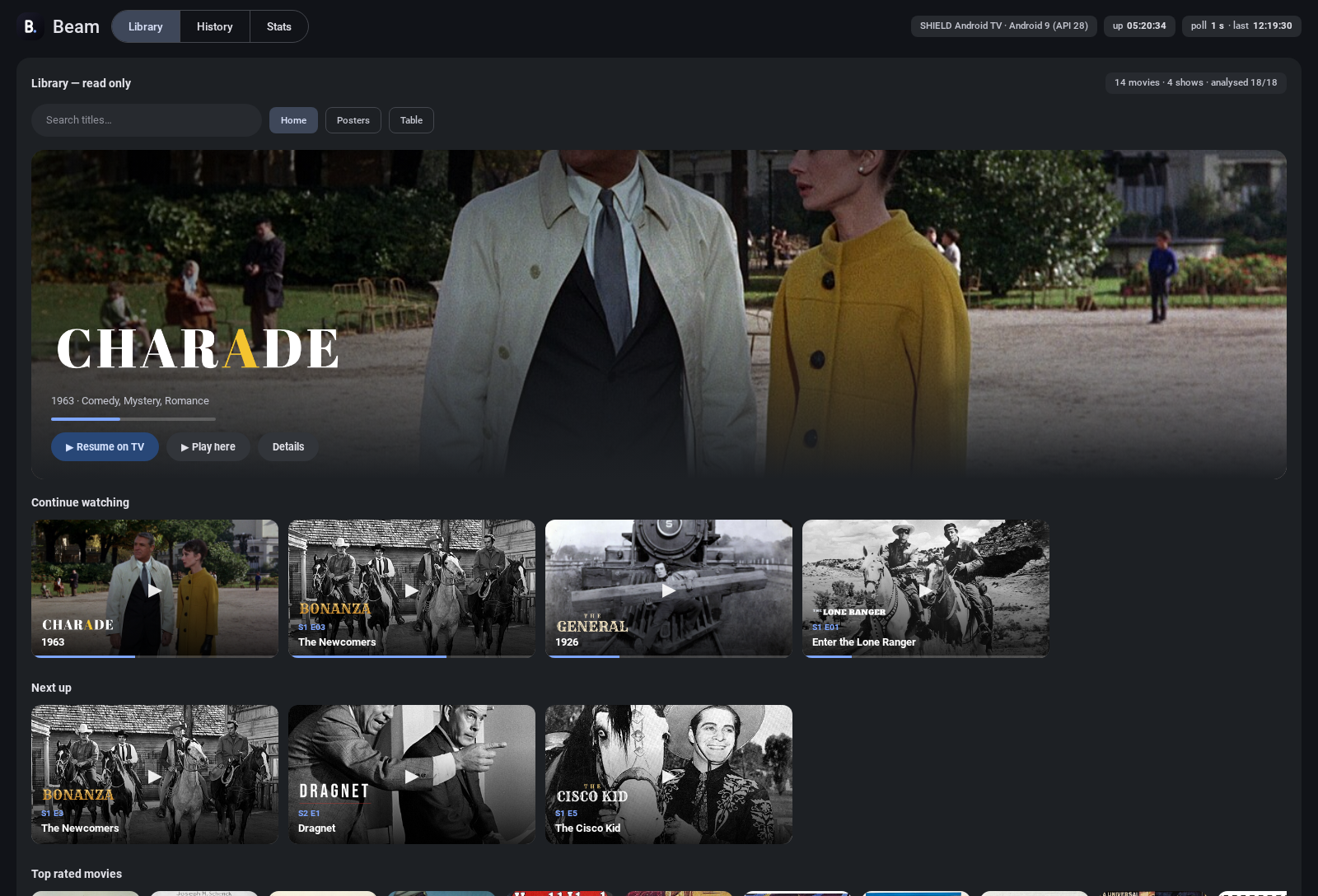
An app-style Home. It opens on a hero with the title's logo, Continue watching and Next up cards, and top-rated and genre rows, the same look as the TV and the phone.
Your library, sliceable. Search; Movies / TV / Kids; 4K, Dolby Vision and HDR10 facets; genre, decade and rating filters; sortable spec columns; per-season drill-downs — and a Surprise me button.
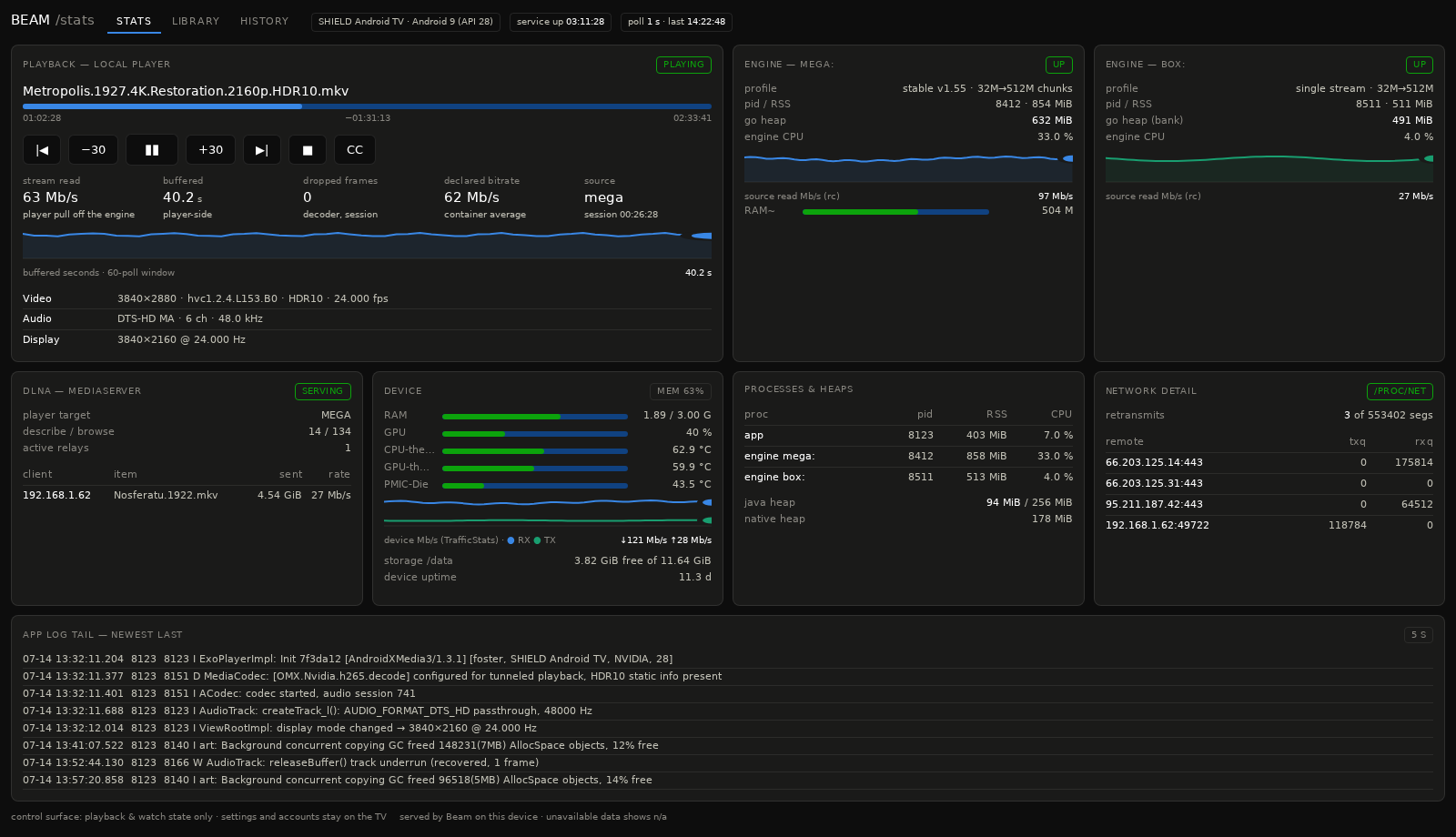
Live telemetry. Stream and buffer sparklines, engine RAM, thermals, per-process CPU, active DLNA relays — and free while no browser is looking.
Safe by design. The page drives playback and watch state, nothing else; settings and accounts never leave the TV.
Web dashboard — live playback and device telemetry
Web dashboard — app-style Home with a title-logo hero, Continue watching and Next up cards
Sharing

A media server for Kodi

One toggle publishes the whole library — movies and TV with covers and titles — as a UPnP/DLNA media server. Kodi or any UPnP client browses Beam and direct-plays from Mega, your seedbox and local drives, with Beam's engines relaying the original bytes. Survives reboots until you switch it off.

Engine

Under the hood

Every source looks identical to the decoder, profiled on real hardware until cold starts, seeks and steady-state all held up.

Embedded engine

Runs as a local server; the player streams from 127.0.0.1, so cloud, seedbox and USB all look identical to the decoder.

Tuned RAM read-ahead

A 128 MB player buffer over hundreds of MB of engine read-ahead, profiled until a memory-constrained 2015 SHIELD held smooth.

Dual engines

A tuned stable engine by default, with a one-toggle experimental engine for A/B testing on your own device.

Room-backed catalog

Library, watch state and specs in a relational store; the app starts from cache instantly and scans refresh incrementally.

One price · all three apps

€12.99, once.

No subscription. Beam for Android TV, with Beam Mobile and Beam Receiver included at no extra cost.

  • BeamAndroid TV
  • Beam MobilePhones & tablets
  • Beam ReceiverAny Android TV
One-time purchase · Instant access · Invoice included